How to Set Up a Piso WiFi Business: A Step-by-Step Guide
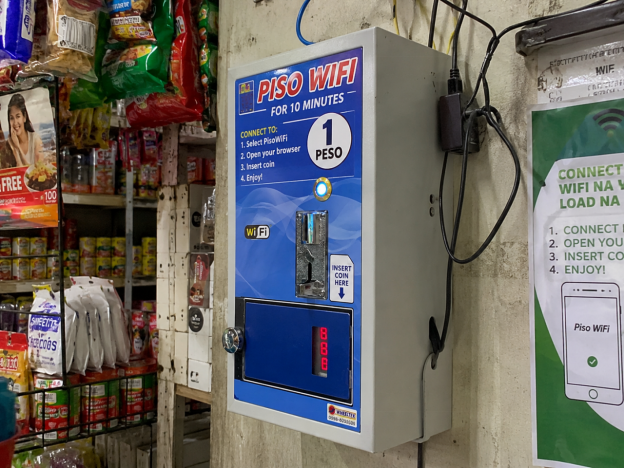
Piso WiFi machines have become a familiar part of everyday life in the Philippines, giving customers affordable internet access in local neighbourhood stores.
The Philippines leads all of Asia-Pacific in WiFi dependency. According to an Opensignal study reported by Philstar in February 2026, 83% of the Philippine population relies on WiFi for digital activities, and Filipinos spend 56% of their connected time on a WiFi network. That kind of demand doesn’t appear by accident. It’s the product of a country where fixed-line broadband still doesn’t reach most homes, leaving shared wireless access as the default for millions of people.
That gap is a genuine business opportunity. Converge ICT CEO Dennis Anthony Uy told Philstar in December 2024 that about 30% of Philippine internet users depend on low-cost “sachet-style” access, and Piso WiFi vending machines are one of the most direct ways to serve that demand. For as little as ₱6,000 to ₱9,000 in startup capital, an individual operator can install a coin-operated machine, pick up a small ISP subscription, and start generating income within the first month.
What follows is a practical guide to getting there – hardware, location, registration, configuration, pricing, and keeping the thing running once it’s up.
What is a Piso WiFi business?
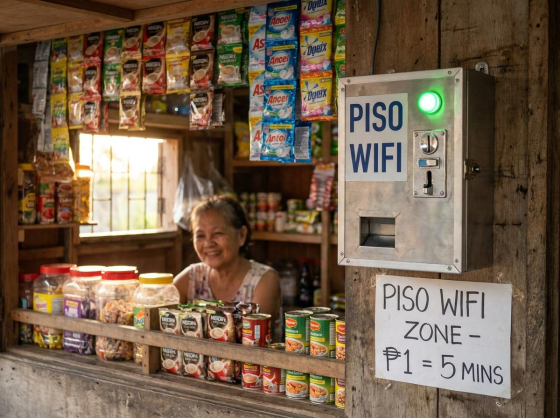
A Piso WiFi vending machine installed at a sari-sari store – the coin-operated model lets customers buy internet time for as little as one peso.
A Piso WiFi business is exactly what the name suggests: a coin-operated machine that sells timed internet access, usually at one peso per session increment. A customer walks up, drops a coin into the slot, and the machine grants them a fixed window of connectivity. When the window ends, the session stops unless they insert another coin.
The machines connect to an ISP subscription on the operator’s side and create a captive portal on the user side. There’s no registration, no contract, no monthly bill for the customer. That friction-free model is a big part of why Piso WiFi spread so quickly in low-income areas, market stalls, transport hubs, and barangay streets across the country.
The business case comes down to one structural fact: the Philippines had fixed broadband penetration of just 28% of households as of 2024, according to the World Bank. That’s well below regional neighbors such as Vietnam and Thailand, meaning more than 7 in 10 Filipino homes don’t have a landline internet connection. Over 99% of registered Philippine businesses are micro, small, and medium enterprises, according to the Department of Trade and Industry (2025), and the Piso WiFi model fits squarely into how this country prefers to do commerce: low-cost, accessible, and informal.
The standard rate across most machines is one peso per five minutes. If you’re trying to figure out how much time one peso buys you on different machine configurations, the answer depends on how the operator sets the timer, but five minutes per peso is the default most customers expect.
The most common complaint you’ll handle as an operator is a failed connection. Getting familiar with why is my WiFi not working from the network side helps you quickly tell apart a machine fault, an ISP outage, and a device-level issue – and that distinction matters when a customer is standing in front of you expecting a fast answer.
Hardware and Equipment You’ll Need
The core setup has four components: the Piso WiFi vendo machine itself, a WiFi router (often included in or paired with the machine), a modem from your ISP, and a stable power supply.
When choosing a machine, look for one that supports remote management through a mobile app or web interface. You’ll want to be able to restart sessions, check uptime, and adjust settings without physically going to the location every time something acts up. Machines that run on Mikrotik-based or similar firmware tend to offer more configuration options than locked-down branded units, which matters once you’re running more than one machine.
Aim for at least 3 Mbps of ISP bandwidth per machine for a decent user experience. If your location draws consistent simultaneous users – say, near a school or a waiting area – budget for 5 to 10 Mbps. Undersizing bandwidth is one of the fastest ways to generate complaints and get a reputation for a slow machine.
A complete single-unit setup – machine, router, cabling, and installation – typically falls between ₱6,000 and ₱9,000. That estimate assumes you’re buying a mid-range vendo unit rather than a premium model with a touchscreen or built-in analytics dashboard.
The coin mechanism deserves special attention before you buy. Cheap coin readers jam regularly, especially in humid or dusty environments. Understanding how to accept coin payments – and what happens when a coin gets stuck – is worth knowing before your first installation, not after your first angry customer.
Choosing the Right Location

High foot traffic locations like markets, transport hubs, and school areas give Piso WiFi machines the customer volume they need to turn a profit.
Location is the single biggest variable in whether a Piso WiFi machine makes money. The hardware is almost identical from one operator to the next. What separates a machine earning ₱7,500 a month from one barely covering its ISP bill is how many people walk past it every day with a coin in their pocket and a few minutes to wait.
Good spots share a few characteristics: consistent foot traffic throughout the day, customers who have time to wait (not just people rushing past), proximity to a power source, and physical security. Markets, jeepney and bus terminals, barangay plazas, school entrances, and waiting rooms at health centers are reliably strong.
Before signing any arrangement with a property owner, do a one-week foot count. Stand near the location for 30 minutes at different times of day and count how many people pass. If the numbers don’t feel significant, they probably aren’t. This is cheaper than installing a machine and discovering low traffic after the fact.
Two things to specifically avoid: residential streets where only a handful of households ever walk past, and locations already crowded with competing machines. Three Piso WiFi units within 50 meters of each other will all lose money. Check the area before committing.
Registering Your Business
Piso WiFi operators are classified as Value-Added Service (VAS) providers because they’re reselling internet bandwidth purchased from an ISP. That classification means you need a Certificate of Registration (CoR) from the National Telecommunications Commission.
The NTC CoR costs ₱300 to file and carries an annual registration fee of ₱6,000 for your first five services. It’s valid for five years and is renewable. This isn’t optional if you want to operate legally – the NTC does run enforcement operations, particularly in urban areas.
Alongside the NTC registration, you’ll also need a barangay clearance, a mayor’s permit from your local government unit, and DTI registration for your business name. The order doesn’t matter much, but most operators get the DTI registration first because the name registration is the cheapest and fastest step.
None of this is as complicated as it sounds. Most requirements can be processed at your local government offices in a few days, and many LGUs now have one-stop shops for MSME registration. Budget two to three weeks for the full process, and don’t start collecting revenue from customers before you’re covered.
Setting Up and Configuring Your Machine
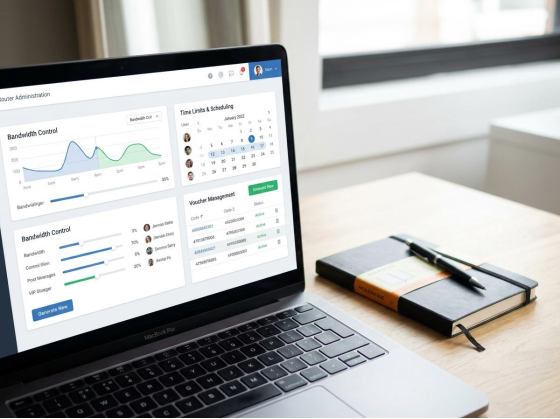
The router admin panel lets operators set time limits, bandwidth caps, and pricing – accessible through a standard browser at 10.0.0.1.
Start by connecting the vendo machine to the ISP modem via Ethernet. Don’t rely on a wireless connection between the modem and machine – use a cable. Wireless backhaul introduces latency and instability that will show up immediately in user complaints.
Next, access the admin panel. Most machines default to 10.0.0.1 as the admin address, though some use 192.168.1.1 depending on the router bundled with the unit. If you’re unfamiliar with logging into your router admin panel, it’s done through a browser – type the IP address into the address bar, enter the credentials printed on the device, and change the default password immediately. Default passwords are public knowledge and leaving them unchanged is a security risk.
Inside the admin panel, configure your session rate (₱1 = 5 minutes is the standard baseline), set per-user bandwidth limits using QoS so one device can’t saturate the entire connection, and enable any captive portal customization you want, such as your business name or a simple landing page.
Test before going live. Insert a coin with a mobile device, connect to the network, and verify that the session timer counts down and terminates correctly. Check that the captive portal intercepts new connections rather than passing them through freely. Fix anything that doesn’t work before the machine is accessible to paying customers.
When something goes wrong after launch – and it will at some point – the fault is rarely the machine itself. ISP outages, device-level settings on the customer’s phone, and cached browser sessions cause most “the WiFi isn’t working” complaints. Knowing how to separate those causes will save you hours of guesswork when a customer brings a problem to you.
Pricing and Your Revenue Model
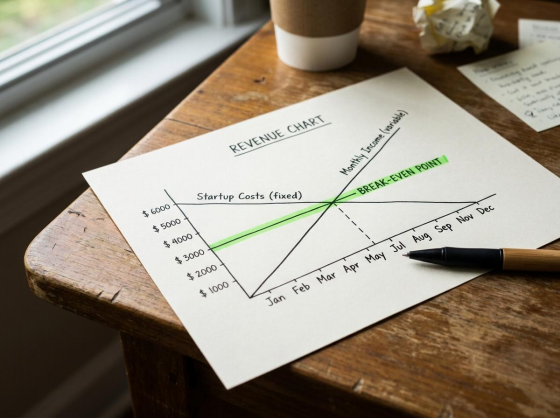
A Piso WiFi machine in a well-chosen location can recover startup costs within one to two months and generate consistent passive income after that.
The standard rate across the Philippines is ₱1 per 5 minutes, which works out to ₱12 per hour. Most operators stick to this because it’s what customers expect, and undercutting by a small margin rarely drives enough additional volume to justify lower earnings per session.
Dynamic pricing is worth considering once you understand your traffic patterns. Some operators lower the rate during off-peak hours – late evening, early morning – to keep the machine running rather than idle. Others offer flat-rate “unlimited” blocks for students who want to sit and study. Both approaches improve utilization without touching daytime pricing.
Revenue estimates for a well-positioned machine in a high-traffic location run to ₱7,500 or more in net profit per month, after ISP subscription costs and the property owner’s cut. At a startup cost of ₱6,000 to ₱9,000, that’s a payback period of one to two months. That figure is not a guarantee – it depends entirely on location quality and how consistently the machine stays online.
The demand side of the equation is structural rather than temporary. The World Bank’s 2024 Philippines digital connectivity report documents a persistent household broadband gap that isn’t closing quickly. Shared access points like Piso WiFi aren’t a workaround; they’re how a significant portion of the population gets online, and that isn’t changing in the near term.
Once a first machine is profitable and you understand the operational routine, adding a second or third unit scales the model without proportionally scaling the workload. The admin panel access, coin reader maintenance, and ISP management are skills you already have by the time you add unit two.
Maintaining Your Network and Handling Customer Issues
The most common mistake new operators make is treating the machine as fully passive. It mostly is, but not entirely. A few regular habits separate operators whose machines run reliably from those who lose revenue to preventable downtime.
Schedule a weekly router restart. Most machines have a scheduled reboot function in the admin settings – use it. Routers left running for weeks without a restart develop session table bloat that slows response times and can cause the captive portal to stop intercepting connections properly.
Clean the coin reader every two weeks. Dust and humidity are the main killers of coin mechanisms in Philippine conditions. A can of compressed air and a dry cloth go a long way. A jammed coin reader means a machine that can’t earn.
Check your ISP’s outage notifications and subscribe to status alerts if your provider offers them. ISP-side outages are the most common cause of customer complaints, and knowing an outage is in progress before a dozen people come to you confused saves considerable frustration. The full regulatory requirements for operators – including complaint handling obligations – are documented in the NTC permit requirements for Piso WiFi businesses, which covers your ongoing obligations as a registered VAS provider.
For customer relations, a laminated note on the machine with a mobile number for complaints is worth its weight. Customers who can reach a real person are far less likely to damage the machine out of frustration than those who have no recourse at all. It’s a small operational detail, but it matters in high-traffic public locations.
The Philippines’ WiFi dependency isn’t softening. Opensignal’s February 2026 data, reported by Philstar, found the country leads Asia-Pacific in the share of connected time spent on WiFi networks. Demand will likely outpace supply in underserved areas for years. That’s the market condition that makes this business work.
Starting Small and Scaling
Piso WiFi isn’t a passive investment that runs without attention, but it’s close to one if you set it up correctly from the start. The operators who struggle are usually those who picked a weak location, bought a cheap machine with a fragile coin reader, or skipped the NTC registration and got caught later.
Get the location right first. Everything else – hardware, configuration, pricing – can be adjusted after the fact. A great location with a mediocre machine still makes money. A mediocre location with perfect hardware often doesn’t.
Start with one machine. Learn the registration process, get comfortable with the admin panel, understand your traffic patterns over two to three months, then decide whether a second unit makes sense. The risk per unit is low enough that this business is worth trying, but it’s not worth overextending before you know what a profitable setup actually looks like in practice.